Social Icons

delicioustwitteremail
Showing posts with label hardware. Show all posts

Thursday, December 6, 2012

Finally Took the Plunge

After going back and forth on a graphics card upgrade for several weeks now, I finally pulled the trigger on an XFX Double D HD 7950 from NCIX. With a $20 referral promo code and $30 rebate I'll be getting the card for ~$258 total. Pretty excited.

The battle more or less came down to three cards in the end: the HD 7870 GHz Edition, the GTX 660 Ti, and the HD 7950. Since we're nearing the end of the current graphics card generation I was reluctant to spend money on a 7870; it's definitely an upgrade over my current 560 Ti, but chances are it won't look so hot compared to the next-gen stuff. The 660 Ti looked like a worthy competitor (plus it has 2 DVI ports) but that 192-bit memory bus still makes me a little sad. In the end, the fact that you can overclock the shit out of the 7950 (on the order of 25% or so) combined with the fact that it'll (hopefully) hold its value the longest out of the bunch led me to choose the 7950.

The price didn't hurt, either.

I'll be sure to post some unboxing pics and benchmarks once I get everything up and running next week. Guess I better grab some numbers from my 560 Ti so I have something to compare the new card to.

Tuesday, October 23, 2012

AMD Vishera FX-8350 Review Roundup

~15% performance gains in some areas, but is it enough?

AMD hasn't exactly been killing it lately. Bulldozer was a flop, shares have been declining, and the company will cut almost 1800 jobs by the end of the year. Ouch.

Intel has opened up a clear lead on the CPU front in the past few years. With Tuesday's launch of Vishera, the follow-up to Zambezi, AMD looks to close that gap. Zambezi CPUs were energy hogs with poor single-threaded performance; despite being priced the same as the i5-2500K, the FX-8150 struggled to compete with Phenom II chips in certain scenarios. AMD's strategy with Vishera, which uses 32nm Piledriver cores, is to regain lost ground in regards to performance while also changing the entry price points of their CPUs.

Deal Alert: SAPPHIRE Radeon HD 7950 for $270 AR, Plus Free Stuff

This AMD "Never Settle" thing looks pretty tempting.

Right now, Newegg has a SAPPHIRE HD 7950 3GB card for $290 with a $20 mail-in rebate. $270 is already a pretty solid price for a 7950, but when you throw in Far Cry 3, Hitman: Absolution, and Sleeping Dogs (not to mention 20% off Medal of Honor: Warfighter), this deal gets straight up ridiculous.

I'm seriously thinking about trading up from my 1GB 560 Ti. Sure, we're near the end of a GPU generation, but that bundle is insane. Plus, 1GB of VRAM is starting to cramp my style a little bit, so the move to 3GB would open up some more options for the future.

Gaming at 2560x1440? Yes please.

Tuesday, October 2, 2012

AMD Trinity: Cheap Desktop Gaming

Last Thursday, AMD lifted the NDA covering their Trinity desktop APUs... sort of. Review sites were allowed to discuss GPU performance of the chips but weren't allowed to disclose much of anything else. Today the curtain gets pulled back fully.


Source: AnandTech

For the uninitiated, an accelerated processing unit (APU) is "a processing system that includes additional processing capability designed to accelerate one or more types of computations outside of a CPU" (Wikipedia). Basically, both AMD and Intel are taking the approach of throwing GPU cores onto their mobile and desktop CPUs. In general, Intel has the edge when it comes to processing power while AMD maintains a pretty sizable lead in the graphics department.

Tuesday, September 18, 2012

GPU News: GTX 660 and 650, AMD's Countermove, and Next-Gen

The GPU market has been pretty active over the last couple of days. After last week's new releases AMD and Nvidia basically have all of their chips on the table at this point. Time for price cut battles and holiday discounts over the next few months.

GTX 650, 660 Unveiled

Last Thursday, Nvidia released the GTX 650 and GTX 660 graphics cards in an effort to fill the gigantic void in their 600-series lineup. The 650 is Nvidia's budget gaming offering and comes in at $110. The 660 falls in line behind the 660 Ti at $230.

I thought about making my own nifty little table showing the tech specs of the newest cards in comparison with what's already on the market, but TechPowerUp already has an incredibly extensive one that would put mine to shame. Here it is:

Source: TechPowerUp

Wednesday, September 12, 2012

Tom's Hardware - "Seven GeForce GTX 660 Ti Cards: Exploring Memory Bandwidth"


Image source: Tom's Hardware

Tom's Hardware posted a pretty interesting article looking at the recently-released GTX 660 Ti. Specifically, the article takes a look at seven cards from various manufacturers and examines the impact of the 660 Ti's 192-bit memory bus on gaming performance when anti-aliasing is cranked up. One feature of the article that I thought was cool was their noise comparison amongst the cards; seems like Asus, Gigabyte, and MSI are still among the best options.

I still don't know what to think of the 660 Ti. The card seems like a dud at the $300 price point now that you can find HD 7950s in the $290-300 range after rebate. Present performance aside, the 7950's 3GB of VRAM and 384-bit memory bus are going to have a lot more staying power than the 660 Ti's 2GB and 192-bit bus. If you're planning on upgrading your GPU every 12 months or so that might not matter, but for someone on a budget the prospect of a card lasting 2-3 years sounds pretty nice.

Tuesday, September 11, 2012

How To Cap Frame Rates with an FPS Limiter

Let's say you're playing an older game, something like Half-Life 2. If you've got a modern gaming rig chances are you're seeing framerates well above 100fps. While many people argue about the limits of human vision and how that applies to framerates, it's safe to say that you're really not benefiting at all from running a game at 195fps. You're putting a lot of unnecessary stress on your system and creating a ton of heat for little to no actual benefit.


Most games have V-sync options that try to sync your framerate to a multiple of your monitor's refresh rate, usually giving you a somewhat steady 30 or 60fps. Unfortunately, this sometimes introduces noticeable input lag. I recently installed CounterStrike: Global Offensive and the mouse feels horrendously laggy under V-sync. Mouse lag and first-person shooters generally don't mix well.

Thankfully it's possible to use a couple of external utilities to limit fps, keeping things well into the "visually smooth" realm while giving your GPU a break.

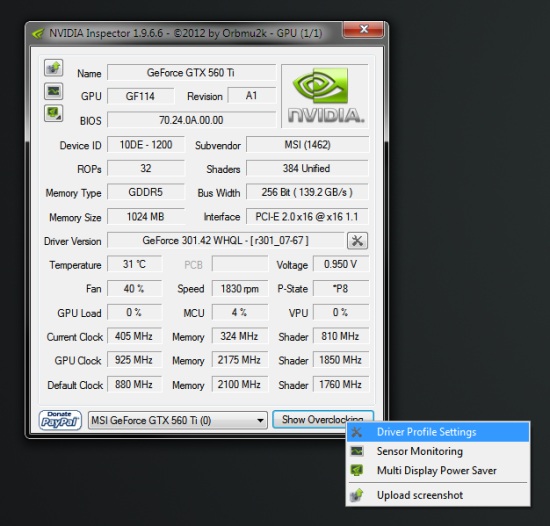
I've mentioned NVIDIA Inspector in the past for its Multi-Display Power Saver, but the utility also includes the ability to tweak some driver settings. The most recent version (1.9.6.6) can be downloaded here.

To enable the fps limiter, right-click the "Show Overclocking" button and select "Driver Profile Settings."


From here, find the "Frame Rate Limiter" listing under the "Common" subheading and choose an fps limit from the dropdown box.


You may need to play around with the limit depending on the games being played and your monitor's refresh rate if you experience any screen tearing or other visual oddities. So far I haven't had any issues.

If you've got an AMD graphics card or don't feel like downloading NVIDIA Inspector, you're not out of luck. MSI Afterburner (and apparently EVGA Precision, though I haven't used that) offers an fps limiter as part of the utility's On-Screen Display program. You can download MSI Afterburner 2.2.3 from Guru3D here.

Open up the MSI On-Screen Display Server - either via the tray icon (airplane with a pink "60") or the start menu - and click on the wrench.


You'll see the framerate limiter listed under the General tab of the window that pops up.

Using the Afterburner method also lets you set profiles for each application you're using. Selecting a different program (or adding your own) from the list allows you to tweak settings individually, so if you'd rather not enact a global limit you've got that option.

Don't be afraid to play around with the settings of either program in order to find what works best for your system. Your graphics card will thank you.

Saturday, August 25, 2012

Future Proof: How Often Should You Upgrade Your PC?

Technology changes rapidly and PC hardware is no exception to that rule. Throughout the 90's and early 2000's we saw some pretty ridiculous advances in computing power, going from single-core CPUs in the 100-200MHz range to the 4/6/8 core 3-4GHz monsters of today.

After deciding that our family's relic from 1999 just wouldn't cut it any more, I built my first computer in 2002 and traded up from a P3 450MHz with PC133 SDRAM to an Athlon XP 2100+ at 1.73GHz and 512MB of DDR. The old machine originally had a Voodoo Banshee 16MB video card, which was apparently "the ultimate bridge between 3D entertainment and PC graphics." I had previously swapped out that card for a GeForce 2 Ti and I further upgraded to a GeForce 4 Ti 4200 128MB with my new build. In a span of three years I moved to a new CPU architecture with more than triple the clock speed of the Pentium III, adopted the first generation of DDR, and picked up a video card with eight times the VRAM and many times the performance of my Banshee. Pretty crazy.

The beautiful Voodoo Banshee. Image: Maximum PC

Examining the Pace of Innovation

The trend has continued in years since, but a couple of articles from this week have me wondering if things might be slowing down. ExtremeTech published an article titled "PC obsolescence is obsolete" on Tuesday that compares the jump in tech from 1996 to 2000 and contrasts it with the advances we've seen from 2008 to 2012. Here's what they had to say about the first four-year span:

"In four years, CPU clockspeed quintupled. Actual performance gains were even higher, thanks to further improvements in CPU efficiency. In 1996, high-performing EDO RAM offered up to 264MB/s of bandwidth, in 2000, PC100 had hit 800MB/s. AGP slots weren’t available in 1996, four years later they were an essential component of an enthusiast PC. USB controllers had gone from dodgy, barely functional schlock that locked up the mouse every time you launched a program, to reasonably reliable. 32MB of RAM was great in 1996, by 2000 you wanted at least 64MB for acceptable performance."

Their current-day performance comparison includes a 2008-era Nephalem i7 system and an Ivy Bridge system of today. Improvements in clock speed and architecture aside, they argue that everything is "roughly comparable:" tri-channel 6GB DDR3-1066 kits can still hang with dual-channel 8GB DDR3-1600, and add-in cards can provide things like USB 3.0 ports or SATAIII for SSDs.

Wednesday, August 22, 2012

Tom's Hardware System Builder Marathon


Every quarter, Tom's Hardware sets out to investigate the PC hardware market. Armed with three budgets - usually $500, $1000, and $2000 - they assemble three builds and compare overall performance and value. We're right in the middle of the August System Builder Marathon this week. On Monday they showed off a $500 gaming PC. Tuesday highlighted a $1000 enthusiast PC, and today showcases a $2000 performance powerhouse.

I always look forward to reading these articles every few months. When you're a PC gamer on a budget, building a computer is all about balance. Reading reviews of $500 video cards is great, but if you're planning on pairing that GTX680 with a dual-core i3 and 2GB of RAM you're going to be disappointed. Tom's does a great job of demonstrating what you can get for your money using currently-available parts. They're experiments, and they're not always perfect, but that's the beauty of it: read a few of these and you'll get an idea of what percentage of your budget you should devote to each part to get the performance you desire.

Tomorrow they'll take a look at the overall value of each build and compare the performance of all three, and it looks like on Friday we'll see a extra "surprise" $2000 build. Spoiler alert: they chose to go with a GTX670 in the $2000 build this quarter, and while it was an all-around solid machine you'd expect to get a little more gaming performance for two grand. I'm guessing they'll drop down from an LGA2011 SB-E setup to an Ivy Bridge i7 and either go with a single 680 or two 670's. Either way it'll be interesting to see what happens.

Monday, August 20, 2012

Why You Need a Solid-State Drive

I'm a pretty frugal guy. When it comes to gaming, I'm always on the lookout for a solid deal and I do the large majority of my game purchasing during Steam sales. Sure, I'll splurge every once in a while, but unless the item in question is an urgent need, I'll usually wait it out.

For me, solid-state drives (SSDs) always fell into the unnecessary category in the past when I was trying to budget a PC build. SSDs perform the same job as a standard hard drive; both serve as internal storage, though SSDs are exponentially more expensive per GB than HDDs. Why shell out a hundred bucks or more for what is essentially a luxury item that isn't explicitly required for your PC to function?

Image: Rainer Knäpper, License: artlibre

The answer in short: adding an SSD to your computer, whether it's a laptop or a $2000 gaming behemoth, will be the single most noticeable upgrade you ever make to your PC.

That's a pretty bold claim, and until I installed an SSD in my own rig it's one that I never would have believed. Once you go with an SSD, you'll never want to go back. They're reliable, they're faster and quieter than a traditional HDD, and in the end they're worth every penny.

Thursday, August 16, 2012

Nvidia GeForce GTX 660 Ti Review Roundup

I grabbed my current video card, an MSI GTX 560 Ti, in February 2011- and to the dismay of my wallet I'm starting to get the upgrade itch again. With today's release of the GTX 660 Ti, both Nvidia and AMD now have all of their cards on the table when it comes to this generation of performance gaming cards.

  Release Date Current Price
GTX 680 03/22/12 $500
HD 7970 01/09/12 $420
GTX 670 05/10/12 $400
HD 7950 01/31/12 $350
GTX 660 Ti 08/16/12 $300
HD 7870 03/05/12 $300
HD 7850 03/05/12 $230

I spent this morning reading a bunch of reviews of the 660 Ti from various sites:

The general consensus going into each review was a concern for the 660 Ti's 192-bit memory bus. In cutting down from the 256-bit bus of the GTX 670, you're looking at a theoretical drop in performance of up to 25% in memory-intensive applications. Thankfully the price was also cut by 25% when compared to the 670, so any improvement over that number makes the 660 Ti a pretty solid performer for the money.

Monday, August 13, 2012

Sound Cards, Headphones and Mics, Oh My


Sennheiser HD555 Headphones
Sennheiser HD555 Headphones by gcg2009, on Flickr

Throughout my illustrious career as a PC gamer I've gone through countless headsets. For a while I would pick up a $10-15 Walmart special and use it for a year or so, usually up until the mic or one side of the headphones would die. I quickly learned how to twist the cord into just the right place to fix a loose connection and patch things up with electrical tape to keep my budget masterpiece going. Eventually I'd give up and trash the thing, find another cheap headset for less than 20 bucks and begin the cycle anew.

At some point I got fed up and thought, "maybe if I actually put some money into these I'll get better sound/mic quality and a better product that lasts for more than 12 months." I found a USB "gaming" headset, an AudioFX Pro 5+1 by Ben Heck, and paid about $65 for it. It was bulkier than the cheap behind-the-head headsets I had been buying, had some interesting styling, flashing lights on the earpieces that indicated listening volume, and best of all (or so I thought), it had a USB connection. This headset died on me after about 9 months and left me a bitter and angry individual. I begrudgingly went back to my $20 headset ways.

Last year, I decided to switch things up a bit. My Logitech G330 was being held together by tape after yet another 12-18 month performance - it was a decent headset that I had bought on sale, and Logitech is usually pretty good for peripherals on the cheap. Rather than checking Newegg or Amazon for my next victim, I decided to do some research and find a solid budget setup that would hopefully last me for a while.

Wednesday, August 1, 2012

TweakTown GTX660 Ti "Review"

Nvidia is probably going to release the GTX660 Ti some time in August, and the rumor mill is actively trying to nail down the final specs. TweakTown supposedly got their hands on a 2GB reference model and put it through its paces. The review can be found here:

http://www.tweaktown.com/reviews/4869/nvidia_geforce_gtx_660_ti_2gb_reference_video_card_review/index1.html

Obviously we won't know the truth for another week or two, so take those results with a grain of salt. I'm currently running a 1GB 560 Ti, so the prospect of flipping my old card and upgrading to a 660 Ti for ~$100 seems pretty tempting if these benchmarks are accurate. Performance in the 7950/7970 range for $250-300? Yes please.

 
AnandTech
Tom's Hardware Reviews
Ars Technica